Instance Metadata
This document provides detailed information on the architecture of NeuroScale instances . Before continuing, please make sure you have read Getting Started, NeuroScale Platform, and Managing Streaming Instances guides for an introduction.
You may also wish to complete the Run a Streaming Pipeline (API) tutorial for a real-world example of interacting with the NeuroScale Platform API.
Architecture of an Instance
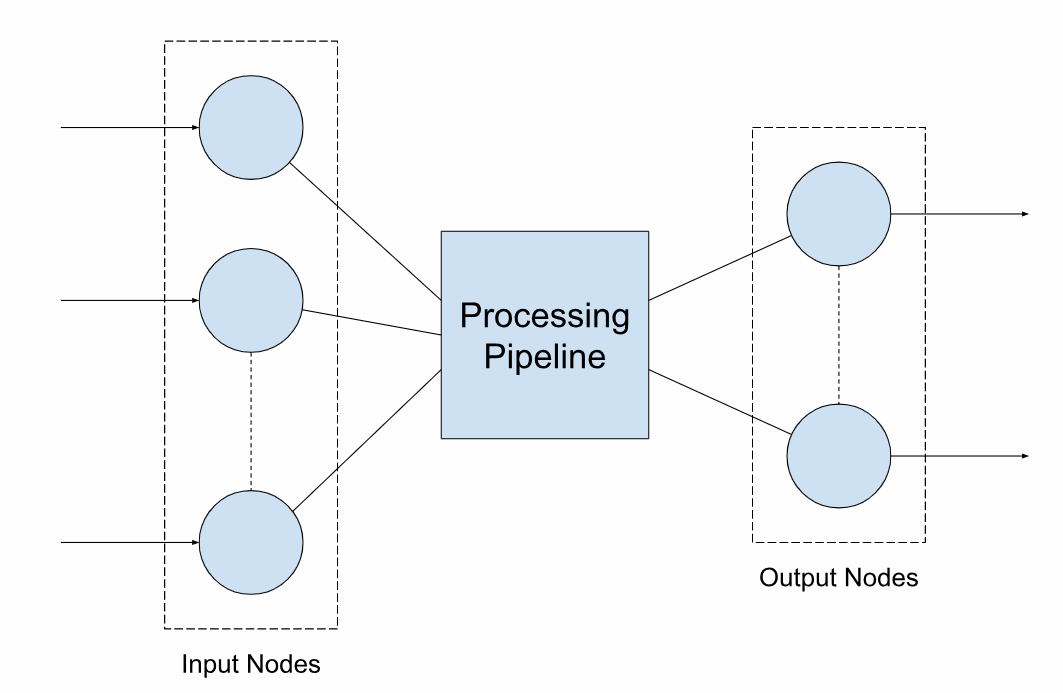
At a basic level, instances created on the NeuroScale Platform consist of the following three components:
- A set of input nodes
- A data processing pipeline
- A set of output nodes
An instance in the running state consumes data messages sent to one or more of its input nodes, processes these data messages through its pipeline, and produces results that are sent to one or more of its output nodes. The general concept is illustrated below:
NeuroScale Data Model
Understanding how NeuroScale models data is vitally important in order to grasp the message format used by a running instance. In particular, NeuroScale distinguishes the following fundamental data types:
- Stream: A named data source.
- Channel: A sequence of time series data points.
A stream contains a name, a type, a sampling rate (regular or irregular) and one or more channels, each of which represents a sequence of time series data points with a unique label.
For example, consider an accelerometer stream containing three axes of motion (x, y and z) sampled at 50 times per second. Such a stream can be represented as a JSON-encoded dictionary (or object) of the following form:
{
    "name": "accelerometer",
    "type": "MoCap",
    "sampling_rate": 50,
    "channels": [
        {
            "label": "x"
        },
        {
            "label": "y"
        },
        {
            "label": "z"
        }
    ]
}
NeuroScale supports a superset of the Extensible Data Format (XDF) stream types, including (but not limited to):
- EEG (for Electroencephalogram)
- MoCap (for Motion Capture)
- Gaze (for gaze/eye tracking parameters)
- VideoRaw (for uncompressed video)
- VideoCompressed (for compressed video)
- Audio (for PCM-encoded audio)
- Markers (for event marker streams)
Understanding Instance Metadata
Every instance created on the NeuroScale Platform contains metadata that describes the configuration of its set of input nodes and its set of output nodes. This metadata is stored as a JSON-encoded dictionary (or object) of the following form:
A node contains a name and one or more streams (as described in the previous section). As such, a node can be thought of as a named grouping of streams. We can model the relationship between nodes, streams and channels as a hierarchy:
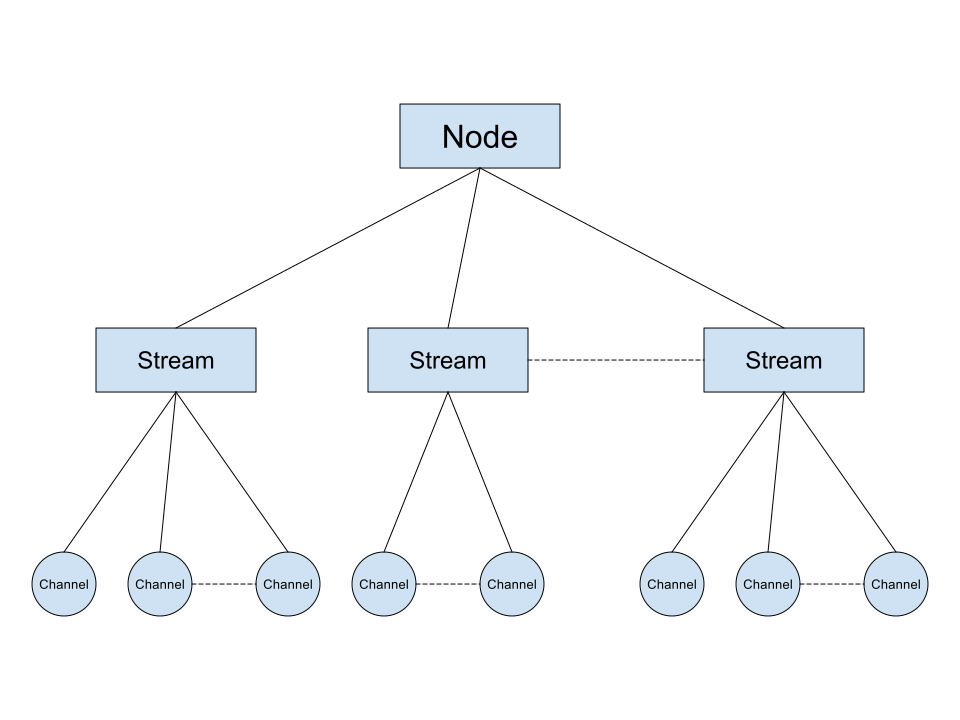
Nodes contain one or more streams. Streams contain one or more channels. For example, consider an instance that calculates the magnitude of a vector (in particular, and continuing our example from the previous section, a 3-dimensional acceleration vector sampled at 50 times per second). The metadata for this instance is a JSON-encoded dictionary (or object) of the following form:
{
    "nodes": {
        "in": [
            {
                "name": "default",
                "streams": [
                    {
                        "name": "accelerometer",
                        "type": "MoCap",
                        "sampling_rate": 50,
                        "channels": [
                            {
                                "label": "x"
                            },
                            {
                                "label": "y"
                            },
                            {
                                "label": "z"
                            }
                        ]
                    }
                ]
            }
        ],
        "out": [
            {
                "name": "default",
                "streams": [
                    {
                        "name": "magnitude",
                        "type": "Scalar",
                        "sampling_rate": 0,
                        "channels": [
                            {
                                "label": "value"
                            }
                        ]
                    }
                ]
            }
        ]
    }
}
The instance has one input node and one output node (both named "default"). The input node defines the "accelerometer" stream while the output node defines the "magnitude" stream (the "magnitude" stream has only a single channel named "value" that contains the result of the calculation).
Where does Instance Metadata come from? How is it generated?
By default, an instance's metadata is copied from the pipeline used to create it.
In some cases, however, pipelines may support implementation-specific metadata that depends on a developer's particular use case (i.e. what input device(s) they're using, what streams are supported by those devices, how many channels are available for each stream, etc.). In these situations, the developer is required to assume responsibility for defining the correct instance metadata for their particular use case within the confines of what the pipeline accepts and supports (see the pipeline's description for detailed guidelines/instructions).
For further information, please read our Using the NeuroScale API (Python) tutorial that contains a detailed example of defining the correct instance metadata for a particular use case of transmitting 8-channel EEG alongside associated event markers. Although written in the Python programming language, the concepts described in the tutorial are applicable in general to the NeuroScale Platform.
Relationship Between Instance Metadata and MQTT
The NeuroScale Platform uses MQTT (a low-latency, lightweight, message-oriented protocol) for real-time communication. As described in the Creating Echo Instances on NeuroScale using cURL tutorial, every instance created on the NeuroScale Platform contains both a write endpoint and a read endpoint for sending and receiving data, respectively. Each of these two endpoints contains a url that defines a globally unique MQTT topic space on which developers can publish data messages into a running instance and subscribe to data messages produced by it.
In order to facilitate efficient communication, NeuroScale maps the MQTT topic space to the corresponding input and output nodes defined by the instance metadata. In other words, input and output nodes are represented as subtopics, where the names of the nodes are the names of the subtopics. To publish data to a particular input node, append / followed by the name of the input node to the root MQTT input topic. To subscribe to data from a particular output node, append / followed by the name of the output node to the root MQTT output topic.
Important!
By default, messages published directly to the root MQTT input topic will be delivered to the first declared input node defined by the instance metadata. This is particularly useful for instances containing only a single input node, but be careful when relying on this behavior for instances containing multiple input nodes.
In addition, it is possible to subscribe to all output nodes at once by subscribing to either the single level MQTT wildcard topic or the multi-level MQTT wildcard topic, i.e. by appending either /+ or /#, respectively, to the root MQTT output topic. In order to minimise bandwidth usage and reduce latency, however, it is recommended to only subscribe to those output nodes that are of specific interest.
For example, consider a pair of streaming endpoints for the instance described in the previous section that calculates the magnitude of a vector:
mqtt://streaming.neuroscale.io:443/pJBQgaFBXvfQJvEjntSjwB/in
mqtt://streaming.neuroscale.io:443/pJBQgaFBXvfQJvEjntSjwB/out
Both of these URLs contain a protocol, a host, a port and a path. The path of the write endpoint's URL defines the root MQTT input topic (/pJBQgaFBXvfQJvEjntSjwB/in). The path of the read endpoint's URL defines the root MQTT output topic (/pJBQgaFBXvfQJvEjntSjwB/out).
Given the instance metadata detailed previously (that of a single input node and a single output node, both named "default"), data messages can be written to the instance by publishing on either of the following MQTT topics:
/pJBQgaFBXvfQJvEjntSjwB/in/pJBQgaFBXvfQJvEjntSjwB/in/default
Similarly, data messages can be read from the instance by subscribing to any of the following MQTT topics:
/pJBQgaFBXvfQJvEjntSjwB/out/+/pJBQgaFBXvfQJvEjntSjwB/out/#/pJBQgaFBXvfQJvEjntSjwB/out/default
In general, it is recommended (where possible) to be explicit when publishing on and subscribing to MQTT topics, rather than relying on the convenience of the special behavior described above. For more information on MQTT wildcard topics, please see the official MQTT v3.1.1 Protocol Specification (in particular, Section 4.7.1).