Stream Data to NeuroScale (API) from LSL
This tutorial will cover how to stream raw data from your device over the Lab Streaming Layer (LSL) network to a streaming pipeline using the NeuroScale API.
This tutorial assumes:
- Your Python environment is installed and setup.
- You have completed the Streaming Data to NeuroScale (API) tutorial.
- You have read through the Lab Streaming Layer page.
- You are reading alongside the source code of the Python example
client_lsl.py(link).
Please look over the Python documentation, go through the Streaming Data to NeuroScale (API) tutorial, Lab Streaming Layer page, and client_lsl.py if this is not the case.
Tutorial Outline
- LSL Overview
- Example: Stream Data with Cognionics
- LSL Components
- Setup Streaming Pipeline That Pulls Data from LSL
- Transmit Data from LSL to NeuroScale
LSL Overview
LSL acts as a central communication hub connecting applications and devices across the LSL network on one clock, including: biosignal hardware (EEG, eye tracking, etc), stimulus presentations, real-time viewers, recorders, online processors, and many more.
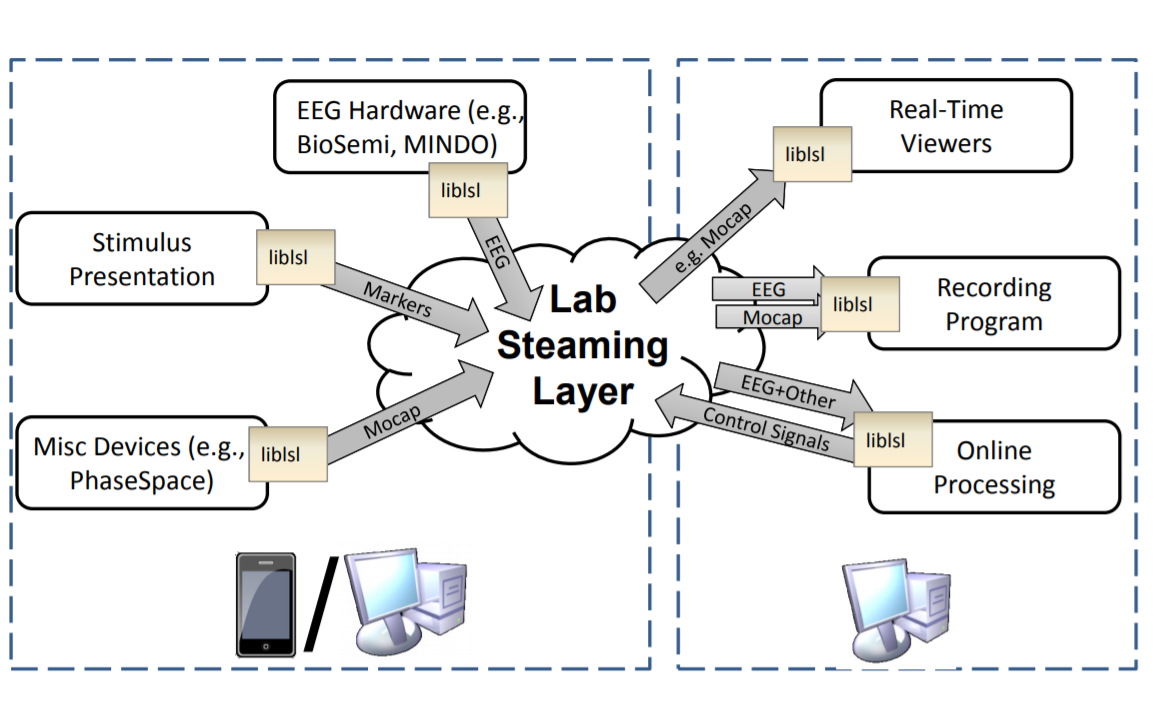
For example, raw data from an EEG headset can be streamed over the LSL network to a NeuroScale client that sends the raw data up to a NeuroScale streaming pipeline for processing in real-time.
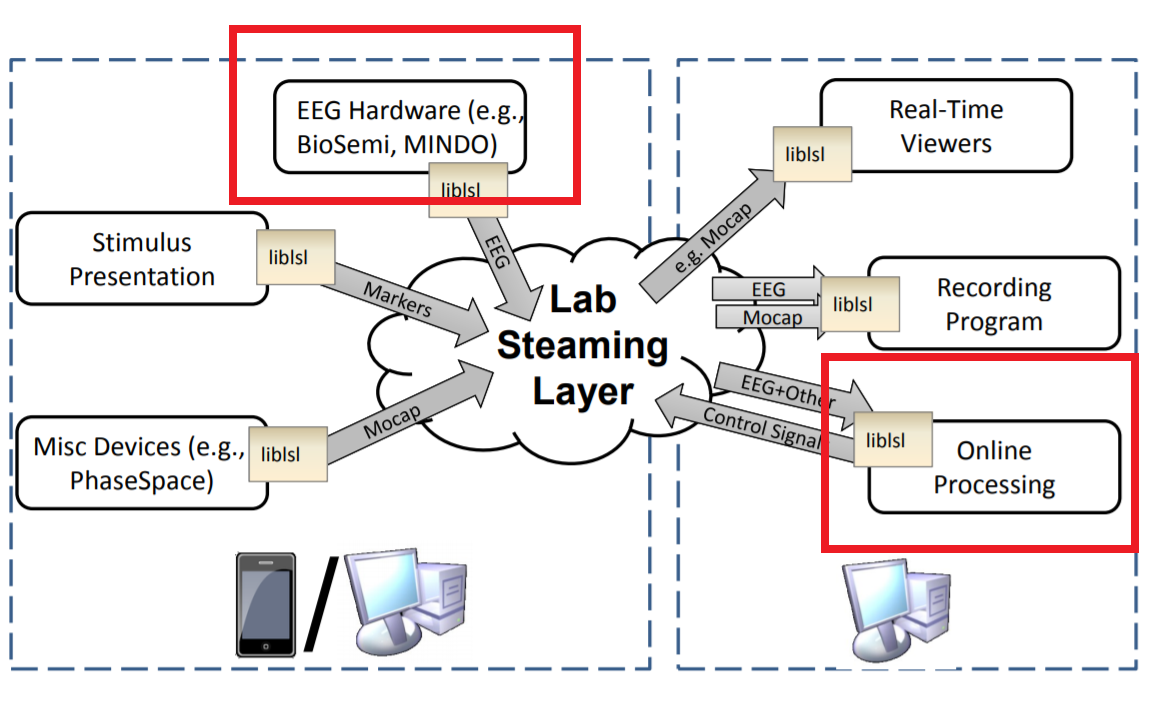
LSL Access to EEG Hardware
Fortunately the majority of EEG systems on the market are currently compatible with LSL. An updated list of EEG hardware compatible with LSL is is kept here. These systems are supported with vendor-provided software, the LSL distribution, or by the OpenViBE acquisition server .
Example: Stream Data with Cognionics
Lets run through an example using the Cognionics EEG headset. Cognionics provides data acquisition software that integrates with LSL; navigate to their download page and install the latest version.
Stream Data
Once your EEG headset is turned on, connect to it over Bluetooth with the data acquisition software by selecting your device in the Discovered Devices window and hitting Connect. Once you see live data streaming in from the headset you can send this data over the LSL network by starting an LSL stream by clicking the Start LabStreamingLayer button:
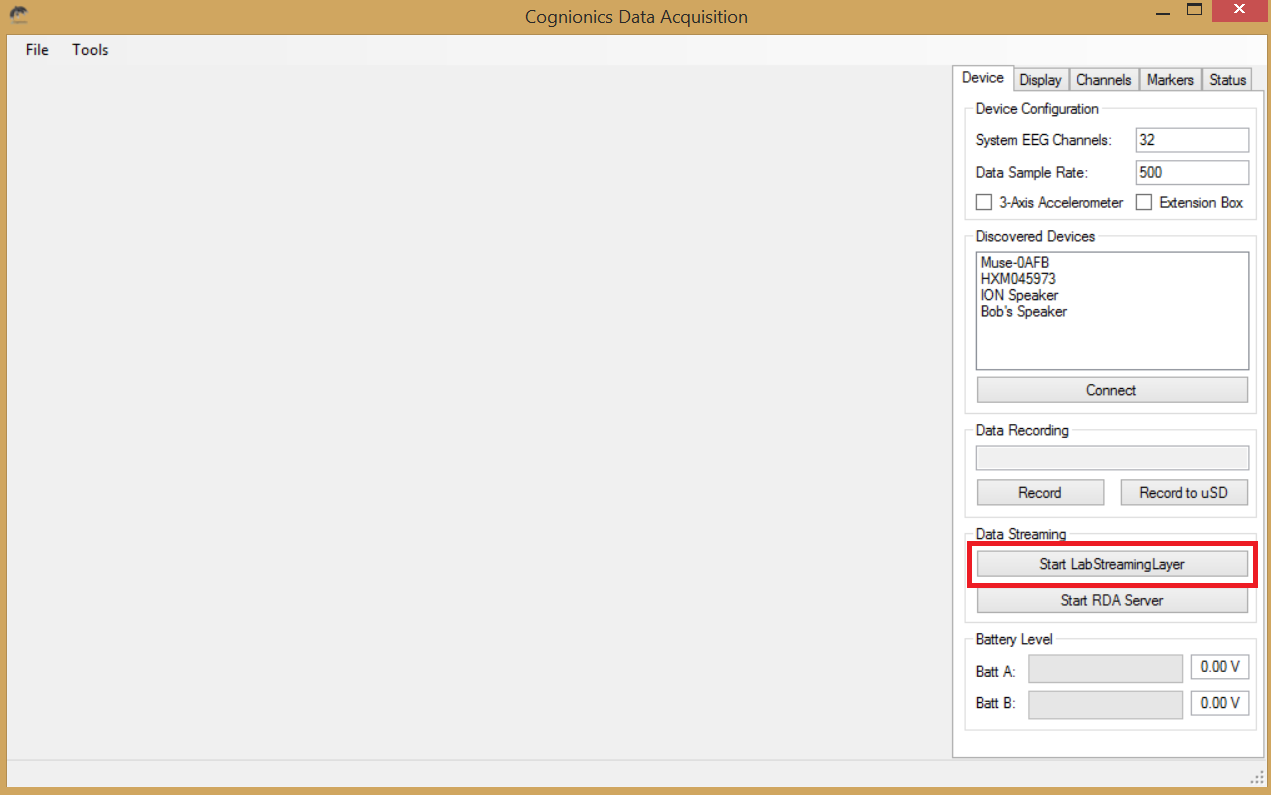
Behind the scenes the Cognionics app is sending your EEG data over the Lab Streaming Layer network in real-time!
LSL Components
Lab Recorder
In order to view and record the Cognionics EEG stream and all other streams on the LSL network we can use the Lab Recorder app, which comes in the LSL distribution. It provides a nice snap shot of the LSL network:.
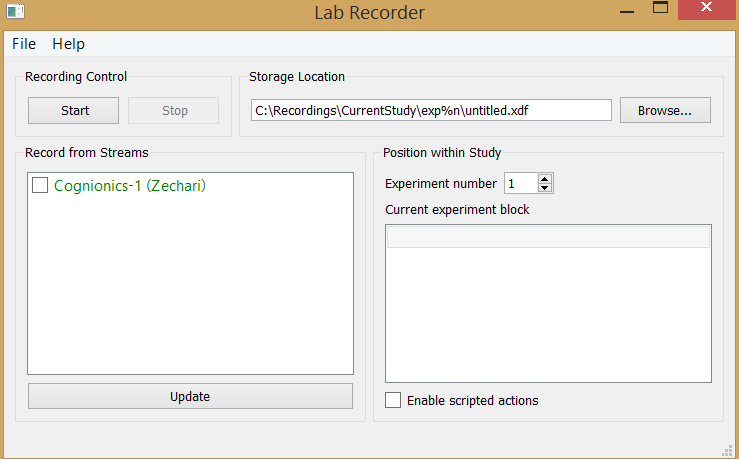
LSL Outlets
Applications that stream data (EEG in this case) out over the LSL network in real-time do so by creating an LSL outlet and pushing data through that outlet onto the network as it becomes available. SendData.py is an example program that demonstrates how to send a multi-channel time series over the LSL network:
"""Example program to demonstrate how to send a multi-channel time series to
LSL."""

import time
from random import random as rand

from pylsl import StreamInfo, StreamOutlet

# first create a new stream info (here we set the name to BioSemi,
# the content-type to EEG, 8 channels, 100 Hz, and float-valued data) The
# last value would be the serial number of the device or some other more or
# less locally unique identifier for the stream as far as available (you
# could also omit it but interrupted connections wouldn't auto-recover)
info = StreamInfo('BioSemi', 'EEG', 8, 100, 'float32', 'myuid34234')

# next make an outlet
outlet = StreamOutlet(info)

print("now sending data...")
while True:
    # make a new random 8-channel sample; this is converted into a
    # pylsl.vectorf (the data type that is expected by push_sample)
    mysample = [rand(), rand(), rand(), rand(), rand(), rand(), rand(), rand()]
    # now send it and wait for a bit
    outlet.push_sample(mysample)
    time.sleep(0.01)
This is essentially what the Cognionics app is doing behind the scenes in the language its written in rather than Python. SendData.py formats the LSL stream information to match the acquisition hardware (an 8 channel BioSemi EEG headset in the example), which is then used to create an LSL outlet. Finally a random 8 channel sample is created and pushed out over the LSL network. The random sample generation mimics real-time data acquisition from the hardware, which may be done via serial port communication depending on the system.
LSL Inlets
Conversely, inlets pull data from the LSL network in real-time. This data can be printed, logged, processed or whatever suits your application. ReceiveData.py is an example program that shows how to read a multi-channel time series from LSL:
"""Example program to show how to read a multi-channel time series from LSL."""

from pylsl import StreamInlet, resolve_stream

# first resolve an EEG stream on the lab network
print("looking for an EEG stream...")
streams = resolve_stream('type', 'EEG')

# create a new inlet to read from the stream
inlet = StreamInlet(streams[0])

while True:
    # get a new sample (you can also omit the timestamp part if you're not
    # interested in it)
    sample, timestamp = inlet.pull_sample()
    print(timestamp, sample)
ReceiveData.py looks for all currently available streams from any outlet on the LSL network, if this stream is found it creates an inlet with that stream's information, and pulls data through that inlet to your application in real-time as it becomes available. Streams can be searched for by any criteria specified in the stream information.
For example by stream type:
Or by stream name:
Stream Info
The StreamInfo object stores the declaration of a data stream.
Represents the following information:
- stream data format (#channels, channel format)
- core information (stream name, content type, sampling rate)
- optional meta-data about the stream content (channel labels, measurement units, etc.)
Whenever a program wants to provide a new stream on the lab network it will typically first create a StreamInfo to describe its properties and then construct a StreamOutlet with it to create the stream on the network. Recipients who discover the outlet can query the StreamInfo; it is also written to disk when recording the stream (playing a similar role as a file header).
Setup Streaming Pipeline That Pulls Data from LSL
In order to stream raw data from your device up to NeuroScale for processing, you must:
- Set up an instance of streaming pipeline
- Have your device sending data over the LSL network
- Pull your device's data off LSL network as it becomes available.
The concepts inclient_lsl.py(link) should be used as a reference for this portion of the tutorial.
Let's start our Python code by adding some prerequisite user information:
import json
import pylsl
import requests
import paho.mqtt.client as mqtt
import msgpack

# we need to define the Neuroscale API URL to use
api_url = 'https://api.neuroscale.io'

# you also need to provide your own access token; for security
# reasons it is best to keep this string out of your code commits and instead
# read it from an environment variable or file (if you do not have a token,
# check our online documentation on how to generate one from your
# username/password combination)
access_token = '<your-access-token>'

# construct the HTTP header that will be used for authorization
auth_header = {'Authorization': 'Bearer ' + access_token,
               "Content-Type": "application/json"
}

# insert the pipeline id extracted from Dashboard or with the NeuroScale API
pipeline_id = pl_RSWmAgPYysWdFJzF7A99GS
Next we need to locate your EEG stream on the LSL network by the stream's type and create a new inlet (note that this will acquire all streams of type 'EEG', locating it by a specific name may be safer depending on how many LSL users are on the network):
# set stream type
input_stream_type = 'EEG'

# resolve a the desired stream on the LSL network
print("looking for the input stream '%s'..." % input_stream_type)
streams = pylsl.resolve_stream('type', input_stream_type)

# create a new inlet
inlet = pylsl.StreamInlet(streams[0])
Next the stream metadata can be parsed from the inlet:
# extract meta-data
info = inlet.info()
sampling_rate = info.nominal_srate()
modality = info.type()
desc = info.desc()
try:
    channel_labels = []
    ch = desc.child('channels').child('channel')
    while not ch.empty():
        channel_labels.append(ch.child_value('label') or '(no label)')
        ch = ch.next_sibling('channel')
    if len(set(channel_labels)) < len(channel_labels):
        raise RuntimeError("Channel labels are not unique!")
    if len(channel_labels) != info.channel_count():
        raise RuntimeError("Incorrect number of channel labels!")
except Exception as e:
    print("Error parsing channel labels: %s; falling back to defaults" % e)
    # not all data sources provide proper channel labels, but Neuroscale
    # requires them, so we make some up
    channel_labels = ['Ch' + str(k) for k in range(info.channel_count())]
With the stream metadata parsed you can set up the pipeline parameters:
# we construct the pipeline meta-data based on the LSL stream's meta-data,
# which are part of the required launch options; we need to declare the list
# of streams that the pipeline is expected to receive and to send back; here
# we want to send an EEG stream
eeg_stream = {"name": "myeeg", "type": modality, "sampling_rate": sampling_rate,
              "channels": [{"label": c} for c in channel_labels]}
# pipelines communicate with their environment through i/o nodes, and to fully
# specify the desired i/o behavior of the pipeline, we need to define those
# nodes and their streams; in our case, the pipeline has only a single node on
# the input and one on the output, and both of them are usually named "default"
node_decl = {"name": "default", "streams": [eeg_stream]}
# the complete meta-data is now just the list of input and ouput nodes
metadata = {"nodes": {"in": [node_decl], "out": [node_decl]}}

# this sample can send either JSON-encoded or msgpack-encoded messages; the
# msgpack format is recommended for anything other than wire debugging
json_fallback = False

# assemble the final launch options for the pipeline; for further options have
# a look at the API docs (for instance, you can toggle some server-side
# features)
params = {"pipeline": pipeline_id, "metadata": metadata,
          "encoding": 'json' if json_fallback else 'msgpack'}
The pipeline parameters and prerequisite information can be used to create an instance of your processing pipeline:
if not instance_id:
    # to launch our processing pipeline now we need to create a new "instance"
    # of the desired pipeline (a running piece of code)
    # IMPORTANT: note that, once the instance has been created, you are
    # consuming resources in the cloud until you destroy the instance again
    r = requests.post(api_url + '/v1/instances', headers=auth_header, json=params)
else:
    # we already know the id of a running instance and we'd like to reconfigure
    # it with new parameters -- this is usually much faster
    r = requests.patch(api_url + '/v1/instances/' + instance_id,
                       headers={'Authorization': auth_header['Authorization'],
                                'Content-Type': 'application/json'},
                       data=json.dumps(params))

if r.status_code == 201 or r.status_code == 200:  # 201: created / 200: ok
    reader = read_endpoint = None
    # we need to extract the instance id from the response so we can shut it
    # down again later (note: it's instructive to print out the JSON response)
    body = r.json()
    instance_id = body['id']
Before we can send data up to NeuroScale, your instance must be ready, the MQTT endpoints need to be obtained, and communication with your instance must be setup. If you are familiar with these steps skip ahead to the Transmit Data from LSL to NeuroScale section.
Review: Obtaining the MQTT Input/Output Endpoints
At this point, you should have a running instance, but you do not yet know the concrete endpoints over which to send/receive data to communicate with the instance. These endpoints can be looked up from the response body that corresponded to the API-URL/v1/instances/instance-id resource (same for the POST, GET and PATCH request cases). The list of endpoint URLs is in the field "endpoints", under "data". Each endpoint has a "url" field, as well as a "mode" field (which is either "read" for pipeline instance outputs or "write" for pipeline instance inputs):
def get_endpoint(x, mode='read'):
  url = [e['url'] for e in x['endpoints']['data'] if e['mode'] == mode]
  return urlparse(url[0])

read_endpoint = get_endpoint(body, mode='read')
write_endpoint = get_endpoint(body, mode='write')
Review: Setting up Communication With the Instance
Now that we have the endpoints, we can establish communication with the instance. Data transmission is done via MQTT, so we first create an MQTT client (the userdata is just for our own use in our callback function implementations). Since we have two endpoints, we need to create two clients, one per endpoint:
Review: Handling Return Messages From Instance
In order to use the streaming results of the pipeline we need a handler that interprets the messages that we receive from the pipeline instance. This is conducted in the on_message function in the python clients:
We will use the following code excerpt to illustrate how to handle the results:
def on_message(client, userdata, msg):
            # this callback will be invoked whenever we get a message back
            # since pipelines may output on additional topics (e.g., producing
            # diagnostics or data from earlier processing stages), but we have
            # only one output LSL stream, we discard any non-default messages
            topic = msg.topic.split('/')[-1]
            if topic != 'default':
                print("received message on non-default topic (%s); ignoring."
                      % topic)
            # the payload must first be decoded using either JSON or msgpack
            # (depending on pipeline settings)
            payload = msg.payload
            data = json.loads(payload) if json_fallback else msgpack.loads(payload)
            # the message has a 'streams' field that is a list of one chunk per
            # stream for which data was received (note that a stream that
            # updates less frequently than others may not be included in every
            # message)
            streams = data[b'streams']
            if streams:
                print('received message on topic %s: ' % msg.topic)
            else:
                print('received empty message on topic %s: ' % msg.topic)
            for stream in streams:
                # the name of the stream: many pipelines will pass the input
                # names through unchanged
                name = stream[b'name']
                # this is a list of samples, each of which is a list of channels
                samples = stream[b'samples']
                # a list of time stamps, one per sample (same length as samples)
                stamps = stream[b'timestamps']
                # here we send our received data back to LSL
                if name == b'myeeg':
                    outlet.push_chunk(samples)
                print('  stream %s: %i samples' %
                      (name, len(stamps)))
Once the pipeline instance is producing output, the data will be received by the MQTT reader client, and will arrive at the on_message() handler function. For pipelines with multiple outputs this function should first check that the topic matches the one of interest (unless that is already taken care of by subscribing to only the desired output node's topic):
Next, the payload of the message needs to be parsed. The message format is the same as for sending data, and is encoded using JSON or MessagePack, according to what was declared when the pipeline was first instantiated:
Once decoded the list of chunks (one per output stream) can be obtained from the "streams" field of the decoded object. Just like a single node can take in multiple streams simultaneously, an output node can also produce multiple output streams. In the case of the Echo pipeline, the output streams are the same as the input streams, and, in fact, the messages should have the same content. In the following Python code, the 'b' prefix is only necessary because the message decoders happen to produce byte strings rather than Unicode strings:
Now each stream and its details can be extracted, including the stream name, an array of multi-channel samples (each an array of values), and an array of timestamps (one per sample):
for stream in streams:
                # the name of the stream: many pipelines will pass the input
                # names through unchanged
                name = stream[b'name']
                # this is a list of samples, each of which is a list of channels
                samples = stream[b'samples']
                # a list of time stamps, one per sample (same length as samples)
                stamps = stream[b'timestamps']
Transmit Data from LSL to NeuroScale
Now you are ready to send your data up to NeuroScale for processing by pulling data from the LSL network with the LSL inlet, formatted into a message encoded in JSON or msgpack, and published to the streaming endpoint in real-time:
...
        # in the following infinite loop we're sending and receiving data
        print('now sending data...')
        while True:
            # read a new chunk from LSL
            samples, timestamps = inlet.pull_chunk()
            if timestamps:
                print("Got new chunk from LSL (len=%s)..." % len(timestamps))

                # build EEG part of the message from it
                eeg_chunk = {'name': 'myeeg', 'samples': samples,
                             'timestamps': timestamps}

                # now build the message that holds the chunk; generally, a
                # message holds a list of one or more stream chunks in a
                # field named streams
                msg = {'streams': [eeg_chunk]}

                # depending on the pipeline configuration, we need to encode
                # either via JSON or msgpack
                if json_fallback:
                    msg = json.dumps(msg)
                else:
                    msg = bytearray(msgpack.dumps(msg))

                # send the message and sleep for a bit in accordance with the
                # sampling rate
                writer.publish('/' + str(write_endpoint.path[1:]), msg)

            # note that using a shorter sleep interval here will lead to more
            # messages per second being transmitted; there is an upper limit
            # to how many messages per second the backend will pick up,
            # and if you find that the output starts to lag behind by several
            # seconds, most likely your transmission interval is too short
            time.sleep(0.1)
Lets go through this code in more detail. Once the while loop is entered you are receiving data from the LSL network and sending up to NeuroScale for processing. The first order of business is to get samples and timestamps from your LSL stream:
If any data is available, it must be properly formatted into a message in order for your pipeline to accept it. Make sure the stream name matches what the pipeline expects; this information can be found in the metadata, which was constructed when you launched your pipeline. Here the data chunk is created and assembled into a message:
# build EEG part of the message from it
                eeg_chunk = {'name': 'myeeg', 'samples': samples,
                             'timestamps': timestamps}
                # now build the message that holds the chunk; generally, a
                # message holds a list of one or more stream chunks in a
                # field named streams
                msg = {'streams': [eeg_chunk]}
This message then encoded in JSON or msgpack and published to the instance's streaming end point:
# depending on the pipeline configuration, we need to encode
                # either via JSON or msgpack
                if json_fallback:
                    msg = json.dumps(msg)
                else:
                    msg = bytearray(msgpack.dumps(msg))

                # send the message and sleep for a bit in accordance with the
                # sampling rate
                writer.publish('/' + str(write_endpoint.path[1:]), msg)
Finally the loop speed is capped by setting a sleep interval, which governs how many messages will be transmitted per second. As the code comments mention, there is an upper limit o how many messages per second the backend will pick up, and if you find that the output starts to lag behind by several seconds, most likely your transmission interval is too short.
# note that using a shorter sleep interval here will lead to more
            # messages per second being transmitted; there is an upper limit
            # to how many messages per second the backend will pick up,
            # and if you find that the output starts to lag behind by several
            # seconds, most likely your transmission interval is too short
            time.sleep(0.1)
Your raw EEG data is now being streamed over the Lab Streaming Layer network to a streaming pipeline! In order to get the results back from NeuroScale please checkout the Stream Results from NeuroScale (API) with LSL tutorial.